Fund ledger software
Cash arrives in lumps. Payroll and obligations don't wait.
Track every deposit in the right fund, split by your rules, and see whether payroll and upcoming obligations are funded before they hit—then export a balanced journal for QuickBooks or Xero. Same product everywhere; choose an industry edition below when the vocabulary matters.
- Many funds in the books—one checking account at the bank
- Automatic splits each time you post a deposit
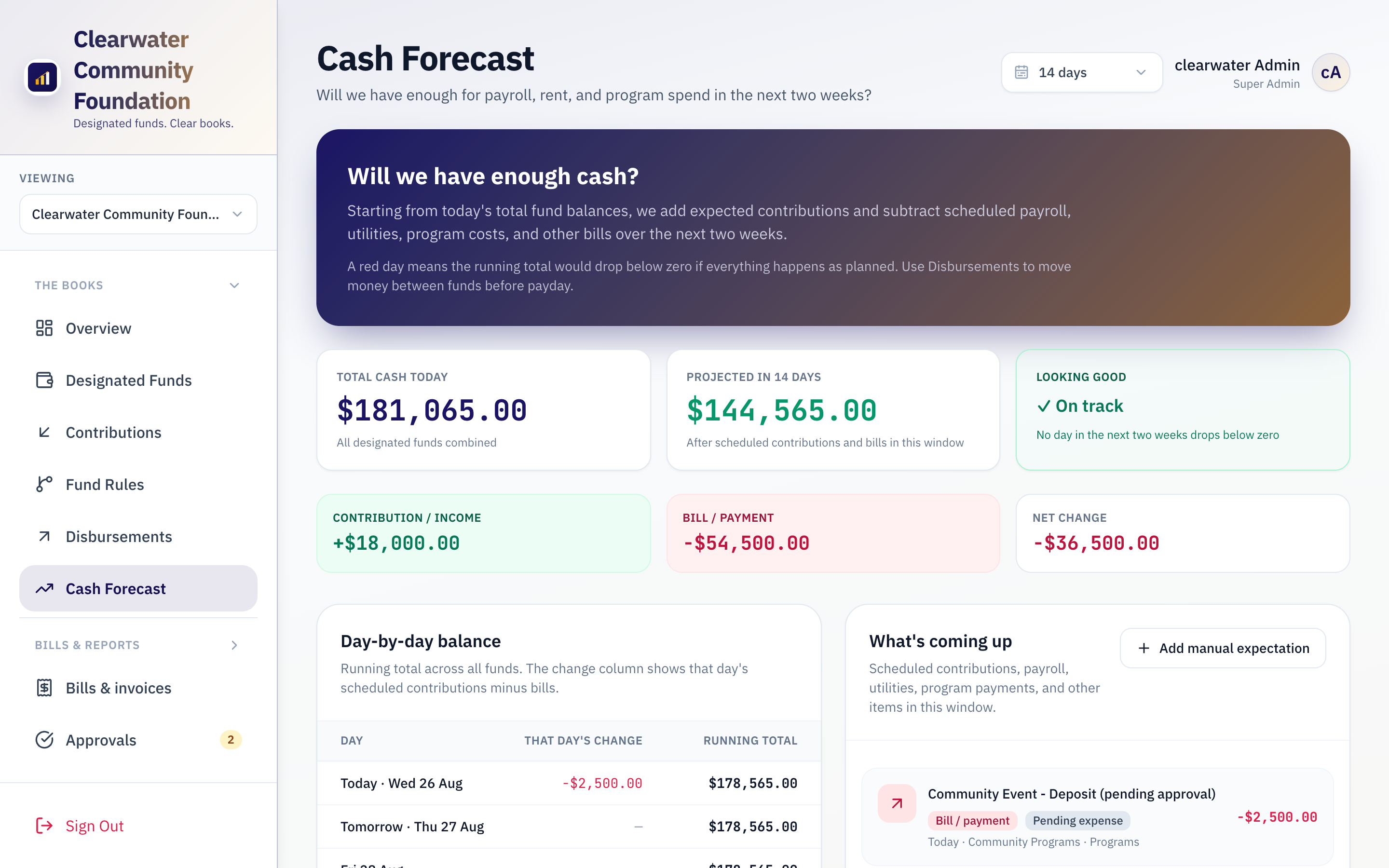
- 14-day cash forecast with low-balance alerts
- Second approval on large entries, with a full audit trail
- Configure funds and rules to match how your team already works
1
Ledger for all your designated funds
14 days
Forward cash visibility out of the box
100%
Every split visible in the fund ledger
< 1 day
Typical time to first posted deposit split
Complements QuickBooks, Xero, and your accountant — doesn't replace them.
Your accountant keeps the GL for tax and GAAP. Rekhoni is where you post deposits to the right funds today — and where bookkeepers map funds to GL lines and take a balanced journal CSV (or optional live sync).
Spreadsheets weren't built for designated funds
When deposits land in one operating account but belong in many buckets, Excel and a single GL line can't tell you what's restricted, what's for payroll, or what's safe to spend.
Restricted cash lives in one checking account
Offerings, remittances, progress payments, and rent collections share one account. Without a fund ledger, you can't show where each deposit was posted—or whether payroll is truly funded.
Manual splits break every week
Bookkeepers rebuild the same allocation math after every deposit. Percentages drift, restricted amounts get mis-coded, and fund balances disagree with what leadership thinks is available.
Payroll surprises are predictable — and preventable
When inflows lag, payroll still runs. Most teams discover the shortfall days before payday—not weeks ahead when there's still time to reallocate in the books.
Your accountant's GL doesn't show fund intent
QuickBooks and Xero track accounts. They don't show how last week's deposit was split across programs, retainage, reserves, and payroll—or who approved each transfer between funds.
How Rekhoni works
Four steps—same for every edition. You configure fund names and rules to match how your team already thinks about cash.
-
1
Connect your operating account
Link your primary bank via Plaid (read-only) or enter balances manually. One account at the bank; many funds in the ledger.
-
2
Define posting rules
Set percentage splits, remainder rules, and fund minimums. Get alerts—or suggested transfers—when payroll or reserve buckets run low.
-
3
Post deposits and split instantly
Record each inflow once. Rules allocate across funds automatically; direct allocations can bypass the split when a deposit belongs 100% to one bucket.
-
4
Forecast, approve, and hand off to accounting
See projected fund balances ahead of scheduled inflows and outflows. Export a balanced journal CSV—or sync to QuickBooks or Xero when connected—for your bookkeeper.
Industry editions
One Rekhoni engine. Separate overview sites when industry language matters—nonprofit stewardship, home health, construction retainage, and others.

CareFlow
Home Healthcare
Medicaid cash timing - payroll funded before every run

FieldFlow
Field Service
HVAC, plumbing, electrical - cash flow on every truck roll

ProjectFlow
Construction
Project cash, handled

PropertyFlow
Property Management
Rent, reserves, and owner disbursements - under control

Rekhoni
General
Designated fund bookkeeping for any organization
StewardFlow
Nonprofits
Designated funds. Clear books.
See the ledger in action
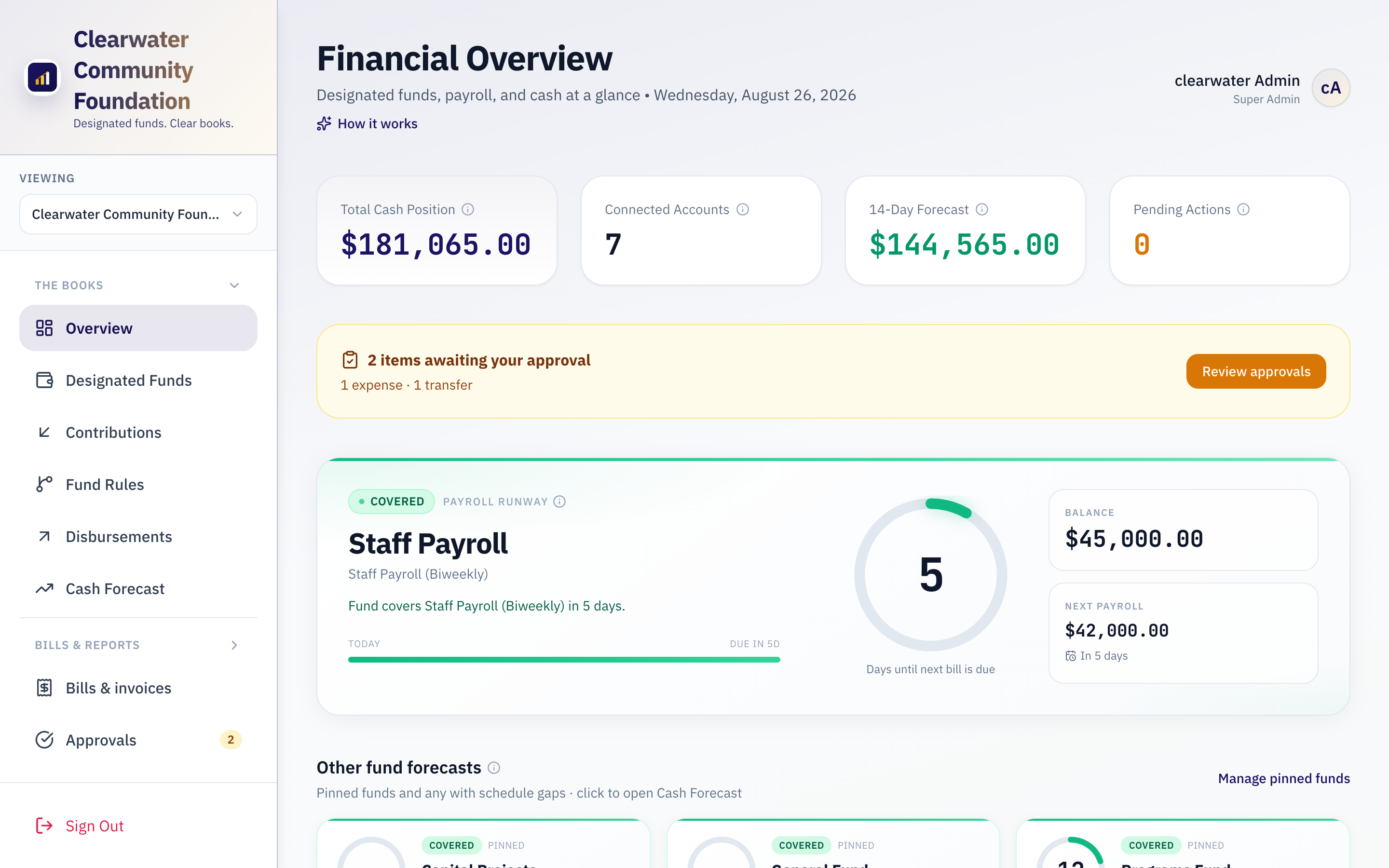
Fund balances, deposit splits, and a 14-day cash forecast — the same core in every industry edition.
Treasury dashboard
14-day cash forecast
Core platform
Included in every edition—designated-fund books, forecast runway, and visibility before payroll or bills hit.
Designated funds in the ledger
Track operating, payroll, reserve, project, and trust buckets against your real bank balance. No new accounts at your financial institution required.
Posting rules engine
Percentage splits, remainder routing, and direct-allocation types in priority order—matched to how your bookkeeper already allocates deposits.
Fund minimums and alerts
Set minimum balances per fund. Get alerts when buckets run low, with suggested inter-fund entries for routine payroll funding.
14-day cash forecast
Project fund balances forward using scheduled deposits and expenses. Flag potential shortfalls while you still have time to reallocate.
Two-person approvals
One role posts; another approves sensitive entries. Large transfers and expenses stay behind a second signature—with a full audit trail.
Activity history
Every posting, transfer, and approval is timestamped with user attribution. Drill into any fund for a running register.
Bank reconciliation
Sync balances from your operating account (Plaid or regional providers). Reconcile posted activity against bank lines without another spreadsheet.
Chart of accounts & GL bridge
Import accounts from QuickBooks or Xero, map funds and categories once, and export balanced journals—or sync live when connected.
Expenses & reports
Bills by fund, budgets, reconciliation, and PDF summaries for boards and owners. CSV handoff always works.
Built for the people who live in the fund ledger
Different industries, same jobs-to-be-done—post deposits correctly, keep payroll funded, and answer questions from the board or the owner.
Treasurer, owner, or finance lead
You need to know what's restricted, what's earmarked for payroll, and what's safe to spend before you approve a check or a transfer.
Bookkeeper or admin
You post deposits, maintain splits, reconcile the bank, and produce journals your accountant can import—without rebuilding Excel every week.
Operations or agency manager
You care that remittances, invoices, or rent collections translate into funded payroll and supplies—not surprises two days before pay run.
Pricing for teams with real fund complexity
Flat monthly plans with guided setup. Scope depends on fund count, bank connections, and optional modules—we confirm on your walkthrough. Not a replacement for QuickBooks; the operational layer on top.
Standard
From $399 /month
One organization with a full chart of designated funds—stop rebuilding allocation math in Excel every time a deposit lands.
- Designated funds and posting rules
- Deposit splits and 14-day cash forecast
- Activity history and bank linking (Plaid / regional providers)
- QuickBooks / Xero journal export
- Guided onboarding with your treasurer or bookkeeper
- Email support
Most popular
Professional
From $649 /month
When a second signature, board reporting, and bookkeeper handoff matter—typical for finance committees and multi-role teams.
- Everything in Standard
- Two-person approvals on sensitive entries
- Board- and committee-ready PDF reports
- Giving import and campaign tracking (where enabled)
- 60-day setup review with your finance team
- Priority email support
Enterprise
Custom
Multi-entity rollout, custom integrations, SSO, or on-premises deployment—scoped after discovery.
- Implementation project and migration support
- Custom integrations
- Advanced permissions and SSO
- Multi-site rollout
- On-premises or self-hosted deployment
- Custom contract terms and DPA
All plans include unlimited users, 14-day cash forecast, and a guided onboarding session. Annual billing saves 15% (Standard from about $4,100/year, Professional from about $6,600/year).
Frequently asked questions
From treasurers, bookkeepers, and operators evaluating Rekhoni.
Why one company and several industry sites?
Rekhoni is one fund-ledger product. Industry sites (StewardFlow, CareFlow, and others) use the same engine with wording and examples that match how that sector talks about cash—so you don't have to translate generic software into your world. Your workspace still runs on Rekhoni; the edition sets labels and optional modules.
Do we need separate bank accounts for each fund?
No. Rekhoni tracks designated funds in the ledger against your real operating account. Many organizations link one checking account via Plaid and post all fund activity in the books. You can also track balances manually if you prefer.
How is this different from QuickBooks or our accounting system?
QuickBooks and Xero are your accountant's system of record for tax and GAAP. Rekhoni is where operations happen day to day: post deposits, split by fund, project fund balances forward, and reconcile against the bank. Bookkeepers map funds to GL accounts and export balanced journals—or sync live when connected. Most teams keep both; Rekhoni replaces the spreadsheet layer between your bank and your GL, not your accountant.
Can we customize funds and posting rules?
Yes. Define ledger funds, percentage splits, remainder rules, and minimum balances to match your chart of accounts. Most teams post their first split in under a day.
What does implementation look like?
Most teams go live in under a day: connect a bank account for reconciliation, set up funds to match your chart of accounts, enter posting rules, and post your first deposit. We walk your bookkeeper or treasurer through setup in a guided session.
Is there a second approver for sensitive entries?
Yes. Configure approval thresholds so one role posts large inter-fund entries or expenses and a second role signs off before they hit the ledger. Every step is recorded.
Is Rekhoni a bank or money transmitter?
No. Rekhoni is bookkeeping software for designated funds. By default, inter-fund entries update your ledger only—they do not move money at your financial institution. Your organization keeps its own bank relationships; we do not hold client funds.
How do you protect our data?
Data is encrypted in transit (TLS), kept private to your organization, and protected with role-based access. Bank linking uses Plaid read-only connections—we never store online banking passwords. More detail on the security page linked in the footer.
Is Rekhoni only for nonprofits?
No. The same engine supports nonprofit stewardship, home health agencies, construction retainage, property trust accounting, and field service operations. Start from the industry edition that matches your language—fundamentals are shared.
Are there optional workflows beyond the fund ledger?
Some industry editions include extra workflows on the same platform. What's included depends on the edition you choose—each edition's site describes it. The shared core is fund accounting, splits, forecast, and accountant handoff.
Can we try it before buying?
We offer guided walkthroughs for teams with multi-fund complexity. Tell us your industry and fund structure when you reach out—we'll use your rules so you can see whether Rekhoni replaces work you're doing manually today.
Do you offer on-premise or private deployment?
Yes. Enterprise includes on-premises or self-hosted deployment when that fits your operations. Contact us to plan deployment, integrations, and support.
Clear fund books in under a day
Schedule a walkthrough with your fund structure and bank setup—or start a trial and pick the industry edition that fits.
Schedule a conversationOr email hello@rekhoni.com
Already have an account? Sign in